Your conversation, your range
Choose a conversation or find a contact. Leave dates blank for the available history, or select the part you want to keep.
Your conversations. Worth keeping.
Preserve SMS, MMS, RCS conversation history and phone call records on Android, then restore them or turn them into clear, chronological PDFs.
SMS • MMS • RCS • Call history
Free to install. Limited free exports. Paid upgrades are one-time purchases.
RCS support depends on content accessible on your device.
Keep your upgrade. No recurring billing.
Prices are in AUD.
Watch SMS2PDF in action
Follow the on-screen demonstration, then explore the full Court Ready sample below.
Press play when you're ready. You control the sound, playback and full-screen view.
2 min 59 sec · Music: Over the Horizon by MarkJuly.
View the full demo PDFA closer look
Review what you want to save, restore your backed-up records, or turn your archive into a readable PDF.
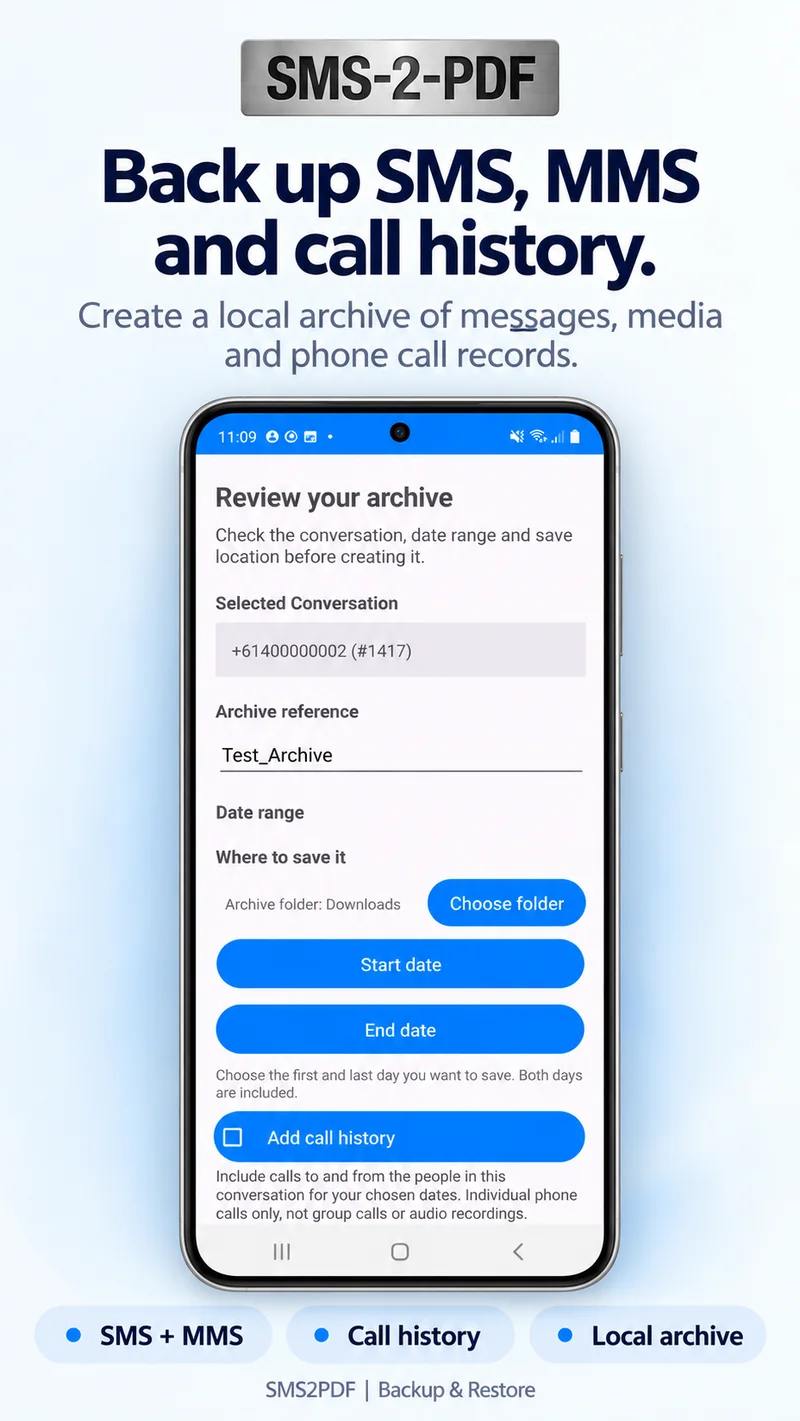
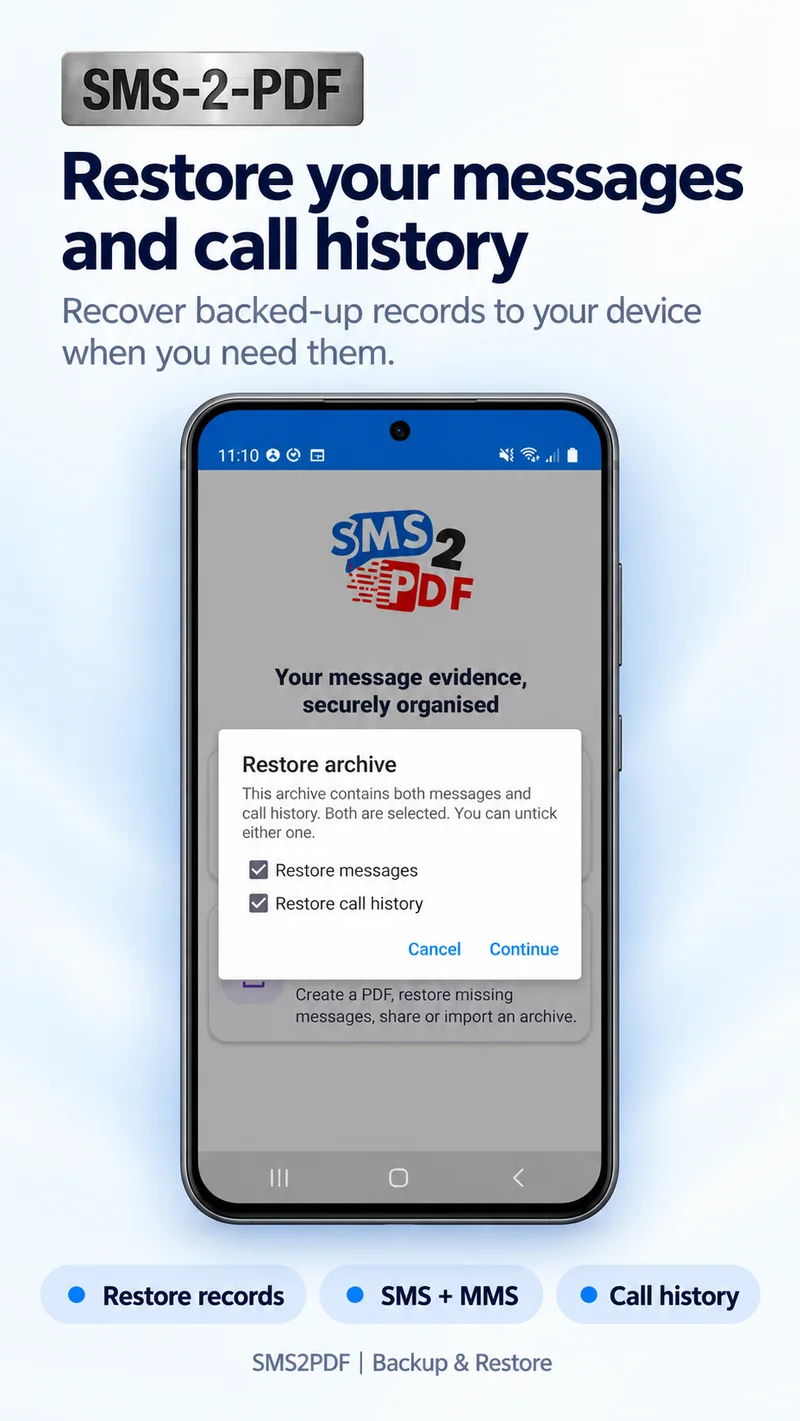
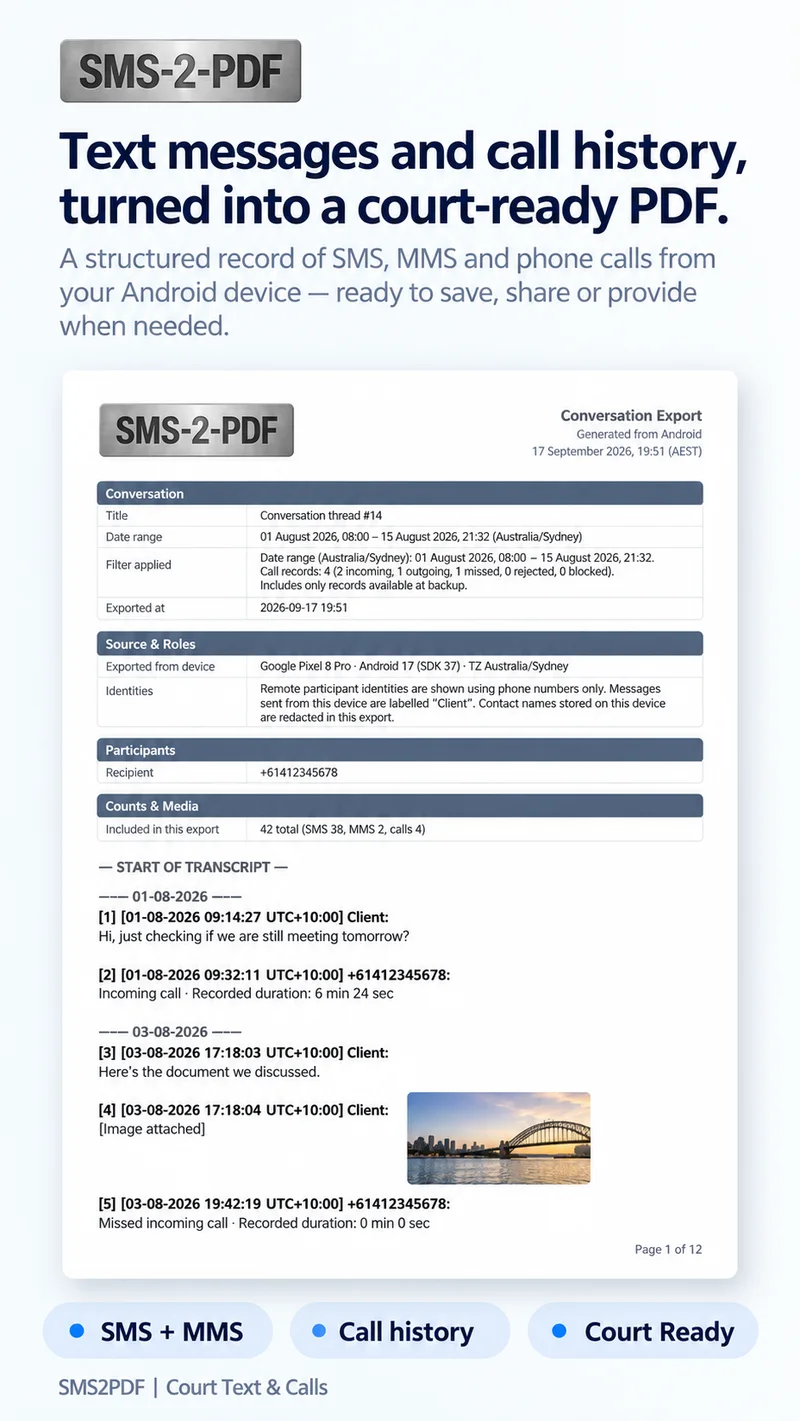
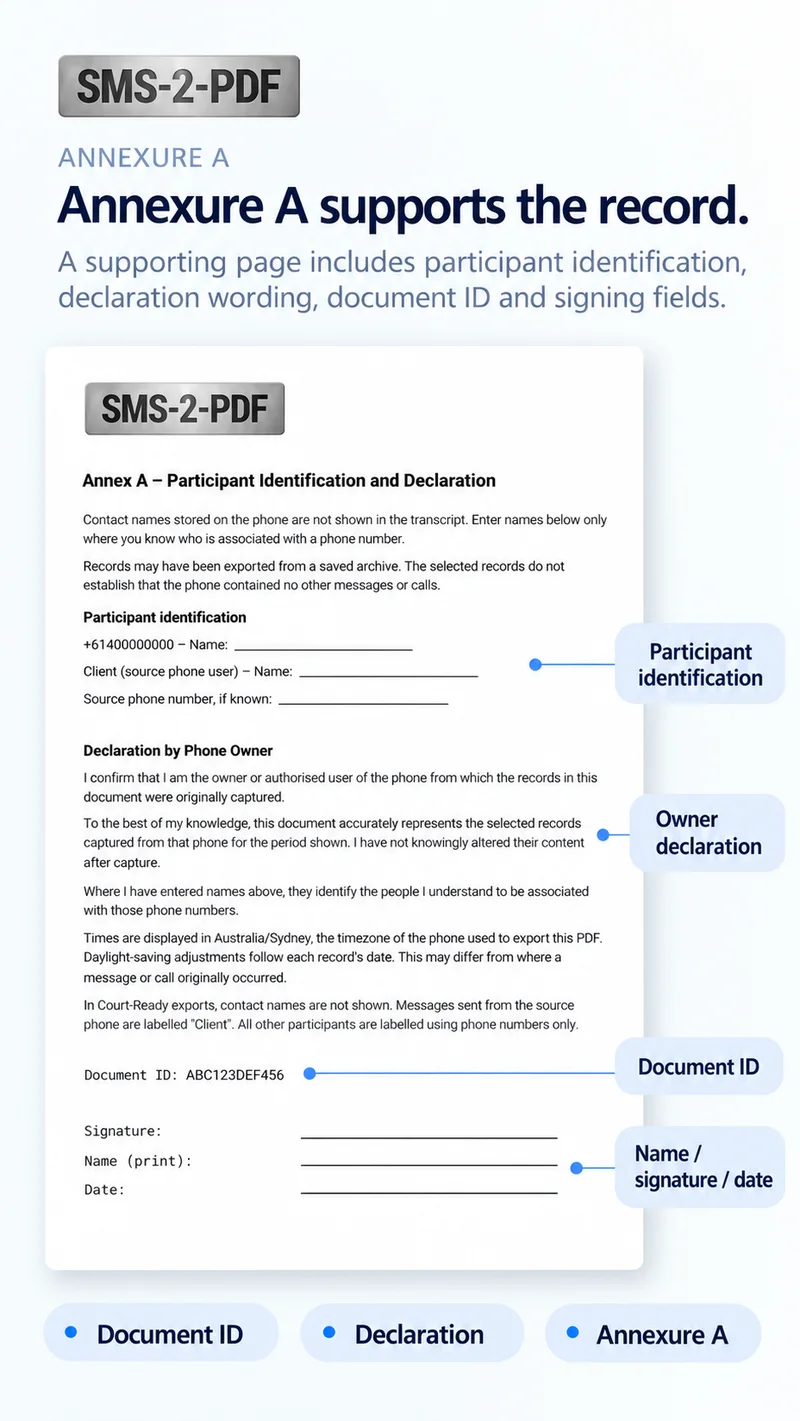
Supplied promotional images: the first two show app screens; the PDF is an illustrative document example. Tap an image to view it larger. Screens and available content may vary by version and device.
How it works
Message backup and restore, with a clear path from selecting a conversation to saving the records that matter.
Choose a conversation or find a contact. Leave dates blank for the available history, or select the part you want to keep.
Create an archive with available messages, media and optional call history. Save it locally or share it to your chosen storage.
Import your archive to restore backed-up records on Android, or export the conversation to a readable PDF.
Backup & restore
A text message backup should keep the conversation useful. Preserve available photos and media alongside messages, and include the phone call records that add context.
Moving to another Android phone? Import your saved archive and restore your backed-up messages and call history.
RCS backup on Android
Conversations have moved beyond traditional SMS. SMS2PDF can preserve supported RCS conversation history that is available and accessible on your device.
RCS availability varies by device, messaging app and how the conversation is stored. SMS2PDF cannot promise access to every RCS implementation or every message.
Friendly · For the people you love
Their little jokes. The “home safe?” messages. The way they always signed off with a kiss.
Sometimes the messages we treasure most are the ordinary ones. A chat with Mum. Words of encouragement from Dad. Years of laughter with a friend.
When someone you love has passed away, those conversations can mean so much. Friendly helps you keep the messages and photos still on your phone in a PDF you can open and read whenever you feel like it.
For someone you miss, someone far away, or simply someone who makes your day — a little of your life together, kept in their own words.
Save a backup too, so you have another copy to keep somewhere safe.
Friendly — A$9.99 once.
No subscription. Make as many PDFs as you like.
You can start with a limited free export and see how your conversation looks before choosing an upgrade.
Messages + calls to PDF
Turn text messages to PDF without piecing together a long series of screenshots. Follow the sequence of a conversation with timestamps, available MMS images, and phone call records.
Keep a readable personal record, print a conversation, or prepare documentation for a discussion with an adviser.
Court Ready
Create structured documentation for situations where the source, participants and sequence need to be easy to understand.
Court Ready presents participants by phone number, redacts contact names, and labels the source device as Client.
See the actual output
Explore a complete five-page SMS2PDF export using a demo group conversation. See the conversation summary, numbered messages, call records, an included photo and the full Annex A declaration page.
5 pages · PDF · Demo content. Supplied export, unchanged. No purchase or sign-in needed to view this sample.
Privacy, by design
Personal conversations should remain yours to manage. You choose what to preserve and where to keep it.
Message and call content is processed on the Android device. SMS2PDF does not upload that content to its own servers.
You do not need to create an SMS2PDF account to use the app.
Archives remain on your device or in storage you choose, including Google Drive or another supported location.
Exported PDFs and archive packages contain personal information. Share them only with the people and services you intend.
Simple, upfront pricing
No recurring billing. Start with limited free exports, then choose the option that fits your records.
Try the workflow.
No purchase to get started.
For memories and personal records.
Keep meaningful conversations, including messages from someone you have lost, in a PDF you can revisit, print or share privately.
For structured documentation.
One-time upgrade.
Prices shown are in Australian dollars. Google Play displays the current price for your country and currency before you purchase. Free export limits and the full upgrade options are shown in the app.
A few useful answers
Yes, for supported RCS conversation history available and accessible on your Android device. Support depends on the device, messaging app and how the content is stored; not every RCS implementation is supported.
You can import an SMS2PDF archive and restore backed-up messages on Android. Keep a copy of the archive in storage you can access from the destination phone. Android may ask you to temporarily change your default messaging app.
Yes. You can include phone call history, including incoming, outgoing and missed calls with timestamps and recorded durations, and restore backed-up call records. This is phone call history, not audio recordings or WhatsApp call history.
SMS2PDF processes message and call content on your device and does not upload it to its own servers. If you choose to save or share an archive through Google Drive or another provider, that service handles the copy you send to it.
No. Friendly and Court Ready are one-time paid upgrades. The app is free to install with limited free exports. See the current local Google Play price before purchasing.
It is a structured PDF format with contact-name redaction, phone-number participant identification, the source device labelled Client, Annexure A, a document ID, and owner declaration and signature fields.
No. It does not certify the contents or guarantee that a court will accept a document. Court requirements vary; seek appropriate advice about the records you need.
In the device folder or storage location you choose. You can also share an archive package to Google Drive or another supported storage provider. Keep your backup somewhere you can access if you replace or lose the phone.
Yes. Select an optional start date, end date, or both when creating an archive. Leave dates blank to include the available history without those date limits.
Who’s behind SMS2PDF
I independently develop SMS2PDF, and I’m the person you reach when you need support.
I built it because getting a complete, readable record of an Android conversation shouldn’t be difficult, invasive or loaded with subscriptions.
I want the app to be straightforward: back up your messages, restore them when you need to, or turn them into a clear PDF.
If SMS2PDF doesn’t work for you, email me and I’ll sort it out.
And if you don’t like it, I’ll refund you. No questions asked.
— Josh, developer of SMS2PDF
Email JoshMade for Android
Back up, restore and export with SMS2PDF.
Get SMS2PDF on Google PlayFree to install. One-time paid upgrade options. No subscription.